


Rails 8 ships with Kamal 2 pre-configured, so every new app can deploy to any Linux server with zero downtime and automatic SSL — no PaaS required.
Many teams pay for expensive Platform-as-a-Service solutions just to avoid managing deployments themselves. Rails 8 removes that trade-off.
What is Kamal?
Kamal is a deployment tool developed by 37signals that uses Docker containers to deploy web applications. It can turn a fresh Linux box into a production ready application server with just a single command.
Before
Before Rails 8, setting up Kamal required manual installation and configuration.
We had to install the gem:
gem install kamalOr add it to the Gemfile:
# Gemfile
gem 'kamal', require: false
Then initialize Kamal:
kamal initThis created configuration files that needed manual setup before we could deploy.
After
Rails 8 now includes Kamal 2 by default.
When we create a new Rails 8 application:
rails new my_appKamal is automatically configured with:
kamalgem in the Gemfileconfig/deploy.ymlwith default configuration.kamal/secretsfor managing sensitive data- A production
Dockerfileready to build and ship
Here’s the config/deploy.yml Rails 8 generates:
# config/deploy.yml
service: my_app
image: username/my_app

servers:
  web:
    - 192.168.0.1

proxy:
  ssl: true
  host: app.example.com

registry:
  username: username
  password:
    - KAMAL_REGISTRY_PASSWORD

env:
  secret:
    - RAILS_MASTER_KEY
  clear:
    SOLID_QUEUE_IN_PUMA: true

aliases:
  console: app exec --interactive --reuse "bin/rails console"
  shell: app exec --interactive --reuse "bash"
  logs: app logs -f
  dbc: app exec --interactive --reuse "bin/rails dbconsole"

volumes:
  - "my_app_storage:/rails/storage"

asset_path: /rails/public/assets

builder:
  arch: amd64
Swap in a server IP, a registry username, and a domain, and the app is deployable.
Key Features of Kamal 2
Kamal Proxy Replaces Traefik
The most significant change in Kamal 2 is the replacement of Traefik with a new purpose-built proxy called Kamal Proxy.
Kamal Proxy provides:
- Zero downtime deployments
- Automatic SSL certificates via Let’s Encrypt
- Support for multiple applications on a single server
- Simpler configuration compared to Traefik
Improved Secrets Management
Kamal 2 introduces a new approach to handling secrets.
Instead of using .env files,
it now supports built in integration with password managers:
Secrets are stored in .kamal/secrets:
# .kamal/secrets
KAMAL_REGISTRY_PASSWORD=$(op read "op://Vault/Docker Hub/password")
RAILS_MASTER_KEY=$(cat config/master.key)
Command Aliases
The aliases section of deploy.yml maps short commands
to longer Kamal invocations.
Rails 8 generates the most useful ones out of the box:
# Start a remote Rails console
kamal console

# Tail application logs
kamal logs

# Open a shell inside the running container
kamal shell

# Start a remote database console
kamal dbc
No SSH-ing into servers and hunting for container IDs.
Deploying with Kamal 2
Once configured, deployment is straightforward.
First, set up the servers:
kamal setupThis command:
- Installs Docker on the target servers
- Sets up Kamal Proxy
- Configures the container network
- Deploys the application
For subsequent deployments:
kamal deployZero Downtime Deployments
Kamal Proxy handles zero downtime deployments automatically.
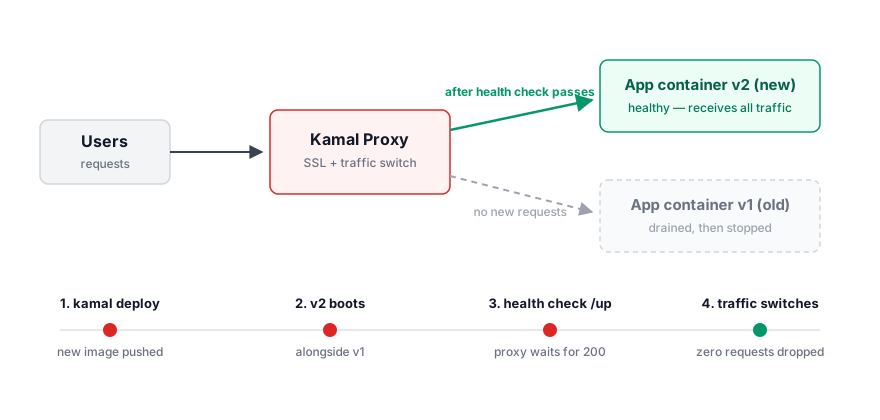
During deployment:
- A new container is started with the updated application
- Kamal Proxy polls the new container’s health check endpoint (
/up, which Rails provides by default) - Once healthy, traffic is seamlessly switched to the new container
- In-flight requests to the old container are drained, then it is stopped
This ensures users never experience downtime during deployments.
Rolling Back
Bad deploys happen. Kamal keeps the old containers around, so rolling back is quick.
List the versions available on the server:
kamal app containersThen roll back to a previous version:
kamal rollback 04b0f8c81cf05a20dd1ea9ce7f10da316b461fe4Since the old container is already on the server,
the rollback is just a traffic switch — no image build, no push.
kamal audit shows who deployed what and when.
What to Watch For
A few practical notes before going all in:
kamal rollbackswitches containers, it does not reverse database migrations. Keep migrations backward compatible so the previous version can still run against the new schema.- Automatic SSL needs the domain’s DNS pointing at the server and port 443 reachable before the first deploy, otherwise Let’s Encrypt certificate issuance fails.
- Upgrading an existing Kamal 1 app? Update the gem and run
kamal upgradeto migrate servers to Kamal Proxy — it can be done one server at a time with--rolling.
SSL for Multi-Tenant Applications
Multi-tenant SaaS applications often need to handle SSL certificates for multiple domains or subdomains. Kamal 2 provides several approaches for this.
Single Domain with Automatic SSL
For applications serving a single domain, Kamal Proxy handles SSL automatically via Let’s Encrypt:
# config/deploy.yml
proxy:
  host: myapp.com
  ssl: true
Kamal Proxy will provision and renew certificates automatically.
Multiple Applications on One Server
Kamal 2 supports running multiple applications on a single server. Each application can have its own domain with automatic SSL.
For the main application:
# config/deploy.yml (main app)
service: main_app
proxy:
  host: app.example.com
  ssl: true
For the API service:
# config/deploy.yml (api)
service: api_service
proxy:
  host: api.example.com
  ssl: true
The first deployment installs Kamal Proxy. Subsequent deployments register with the existing proxy.
We can verify running applications on the server:
kamal-proxy listMultiple Hosts for One Application
An application can respond to multiple domains:
# config/deploy.yml
proxy:
  hosts:
    - example.com
    - www.example.com
  ssl: true
Custom SSL Certificates
When Let’s Encrypt is not suitable, we can provide custom certificates:
# config/deploy.yml
proxy:
  host: myapp.com
  ssl:
    certificate_pem: SSL_CERT_PEM
    private_key_pem: SSL_KEY_PEM
The certificate values are read from secrets.
Wildcard Domains for True Multi-Tenancy
For applications with customer subdomains like customer1.myapp.com,
Kamal Proxy does not yet support wildcard certificates natively.
The recommended approach is to use Caddy as a reverse proxy in front of Kamal Proxy:
# Caddyfile
*.myapp.com {
  tls {
    on_demand
  }
  reverse_proxy localhost:8080
}
Caddy can be deployed as a Kamal accessory:
# config/deploy.yml
accessories:
  caddy:
    image: caddy:latest
    host: 192.168.0.1
    port: "443:443"
    files:
      - config/Caddyfile:/etc/caddy/Caddyfile
When using Caddy, disable SSL in Kamal Proxy:
proxy:
  host: myapp.com
  ssl: false
This setup allows Caddy to handle wildcard certificates while Kamal Proxy manages the application containers.
The Complete No-PaaS Stack
Kamal 2 is one piece of the Rails 8 story. Combined with the Solid adapters, a single server can now run the entire stack that previously needed Redis, a job runner, and a managed platform:
- Solid Queue for background jobs
- Solid Cache for caching
- Solid Cable for WebSockets
One server, one database, one kamal deploy.
Skipping Kamal
If we prefer not to use Kamal, we can skip it when creating a new application:
rails new my_app --skip-kamalConclusion
Kamal 2 in Rails 8 makes deployment accessible to everyone. We no longer need expensive PaaS solutions or complex infrastructure setups.
With just a few commands, we can deploy our Rails applications to any server with zero downtime and automatic SSL.


